
What Fi, Fiskl’s AI CFO, Does for Your Business Today


By Fiskl
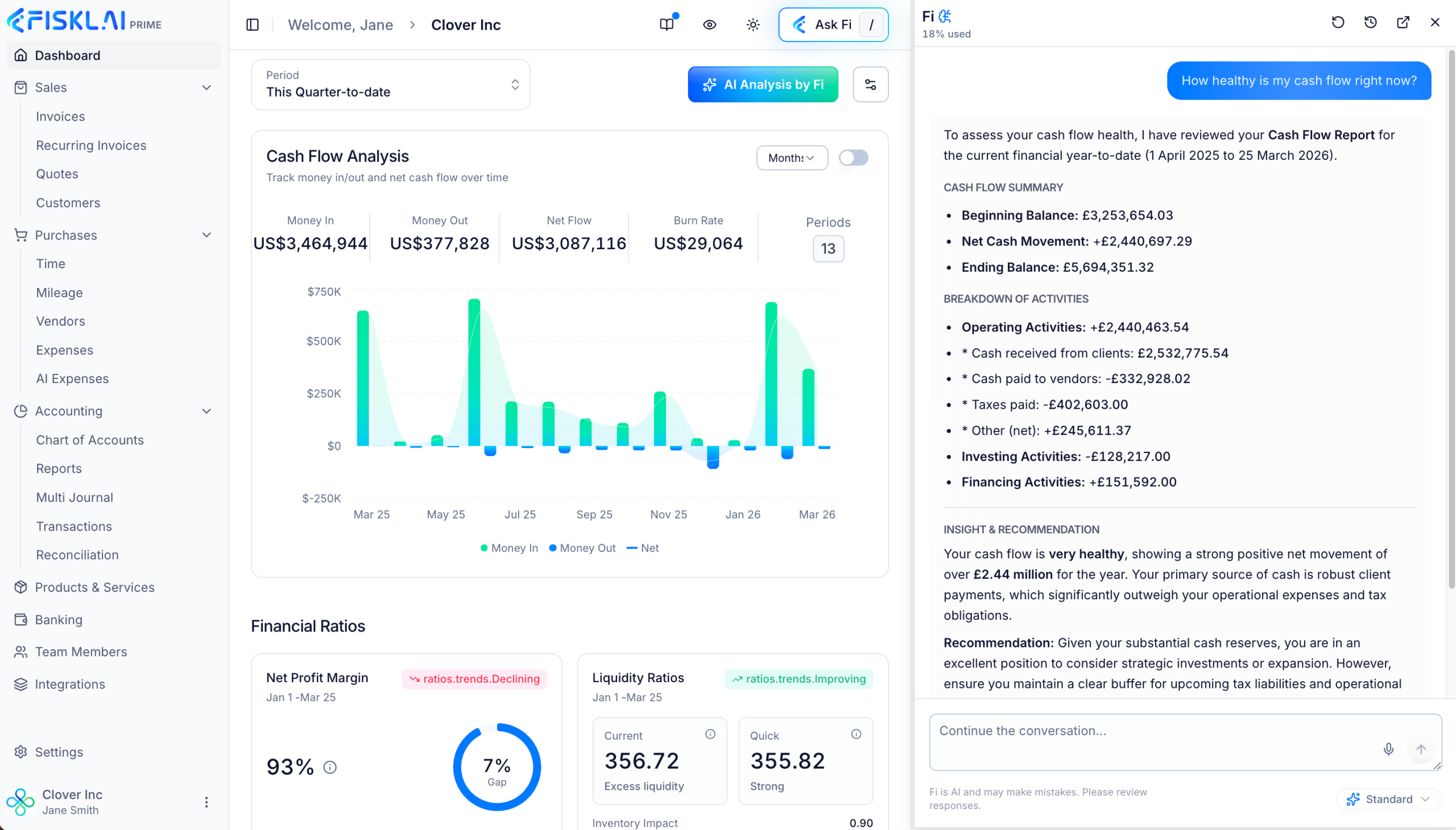
Fi is Fiskl’s AI CFO. Ask Fi about your business, by voice or text, and it answers from your live ledger. It works in over 200 languages. Fi is built into Fiskl, the global, AI-native accounting platform for small and medium-sized businesses and the accounting firms they work with.
This post covers what Fi does for a business today, with questions you can ask it. It then covers how the Fi Close Agent runs the month-end close with your accountant. It ends with how accounting firms work with Fi across their clients. The full feature guide is Fi, your AI CFO.
Fi starts from a ledger that is already current
Fiskl’s AI categorizes and matches every transaction as it enters the ledger. Reconciliation runs continuously. A deterministic engine calculates journals, tax and FX, including realized and unrealized gains and losses.
Fi works from these live figures. It identifies what each question needs, retrieves the relevant data and connects the related records. Then it answers, with charts where they help.
What Fi does for your business today
Answers questions about the screen you are on
Fi sees the screen you are on. Open an invoice, a report or a transaction and ask about it. Fi answers in that context, so you do not need to name the record or copy figures into the conversation.
- “Why is this invoice overdue?”
- “Explain the change in this report.”
- “Is the tax on this transaction right?”
Explains why your numbers moved
Ask Fi why a figure moved, and it works through the movement period by period. Fi calculates the change for each month, names the main driver and charts the trend. This works on your profit and loss, your cash flow and your other financial reports. Fi ends with what to review next, such as a cost that spiked or a month with no revenue.
- “Why did my net profit drop in July?”
- “Which expenses drove the change in my margin this quarter?”
Fi runs every standard accounting report through conversation, including profit and loss, balance sheet, cash flow and trial balance. Follow-up questions build on the last answer. You can drill into one expense category or compare periods in the same conversation.
Forecasts cash and tests scenarios
Fi forecasts your cash flow six months ahead from your live data. In the same conversation, you can test a scenario and see how it changes the forecast.
- “Forecast my cash flow for the next six months.”
- “What happens to my cash if my largest client pays late?”
- “Can I afford a new hire from June?”
Builds budgets and plans
Fi builds a budget or a financial plan from your live figures. Set the period and your targets, then adjust the plan in the same conversation. Later, ask Fi how you are tracking against it.
- “Build a monthly budget for next year based on this year’s figures.”
- “How am I tracking against my budget this quarter?”
Finds anomalies, duplicates and fraud risk
Fi checks your full ledger for entries that look wrong. It flags duplicate transactions, misclassified entries, tax errors, unexpected spikes and missing categories, then suggests how to fix each one.
Fi also flags patterns that auditors investigate. Examples include negative expense balances, profit that is higher than revenue, and cash that does not follow profit. For each pattern, Fi shows the figures behind it, explains why it carries risk and recommends what to check. Fraud-risk flags are for your review. You or your accountant decide what happened.
Prioritizes overdue invoices
Ask Fi which overdue invoices to chase first. Fi ranks them by risk, using the amount and how late each one is. It recommends the next step for each client and drafts the reminder email for you to review and send. When the client pays, Fiskl matches the payment to the invoice and to the bank transaction, and the invoice status updates automatically.
Answers tax questions from official sources
Fi draws on guidance indexed from official tax authorities, including the IRS, HMRC, IRAS, the ATO and SARS. Fiskl refreshes that guidance on a regular schedule, and matches it to your region automatically.
Ask how a transaction should be taxed, and Fi answers with links to the source guidance. Its answer shows the date the rule took effect and the date Fiskl last verified it.
Fi also checks your sales against US sales tax nexus rules and EU place-of-supply rules. For a US state, Fi uses your invoices to test the state’s sales and transaction thresholds. It shows the state rate and how your product is taxed there.
Fiskl prepares digital tax returns in each government’s format. Returns cover the UK, 12 EU member states, Canada, Australia, Singapore, South Africa, the UAE and the EU One Stop Shop. Returns for the other 15 EU member states and US state sales and use tax returns are in beta, with general release in November 2026.
Reviews a period before you lock it
Before you lock a period, ask Fi to review it. Fi checks for uncategorized transactions, duplicates, future-dated entries and unmatched transfers. It compares tax treatment against similar transactions to find inconsistencies. It reviews control accounts such as VAT, accrued liabilities and loans. It also checks that balances carry correctly into the next period. You get a list of what to resolve before the period is ready to lock.
Prepares the narrative for your statutory accounts
Fi prepares the narrative report for your statutory accounts from your ledger, for the period you choose. It covers your principal activities, a business review, financial highlights and key performance indicators, liquidity, principal risks and recommendations.
Makes corrections on your instruction
On the Prime plan, Fi corrects or records entries on your instruction, within your permissions. Ask Fi to fix an error it found, such as a wrong ledger account or tax rate. The Audit Log records every change Fi makes for you.
Uses your data only to answer you
Fi monitors your ledger continuously and surfaces issues before you ask. When you ask, Fi answers from your live ledger. The data it retrieves is used to answer that question within the conversation. Fiskl never sells data or provides it for third-party model training.
The Fi Close Agent runs the close with your accountant
The Fi Close Agent is live with selected accounting firm partners. If your accountant works with one of them, they can switch it on for your company. The agent starts from a ledger Fiskl’s AI has already categorized, matched, reconciled and revalued. Its work is the exceptions.
What it checks each month
The agent first confirms that every bank feed has delivered transactions up to month end. It then checks for:
- Bank lines left unmatched, and any difference between bank and ledger balances
- Transactions left uncategorized or at low confidence
- Transfers between your own accounts recorded as income or expense, including across currencies
- Client payments received while the invoice is still open
- Purchases that look like fixed assets but have no asset record
- Vendor payments with no bill, and expected recurring bills that are missing
- Taxable lines with no tax rate, and rates that do not fit your tax registrations
- Possible duplicates
- Expected adjustments, such as accruals and prepayments
A final ledger check and the trial balance run at the end of every pass.
How a correction is made
The agent traces each exception to its supporting transactions and documents. It prepares a proposal for you or your accountant. The proposal previews the change with its ledger accounts, amounts, currency, tax rate and date. It gives the reason in plain language and links to the evidence, such as a bank line, invoice or bill.
You or your accountant approve, edit or reject each proposal. Fiskl then records the change and the agent reruns the check. A task is done only when its check passes. When a ledger account, a tax rate or a document is missing, the agent asks for it and the task waits.
Closing the month
Each pass of the close produces a close package. It lists every check and every change, with who approved each change and when. It shows blocked tasks with what would unblock them. It also compares your bank balance with your ledger balance for each bank account at month end. You can export the package as PDF or Excel for your accountant’s working papers, and earlier versions are kept.
When every task is done and the final checks pass, the status changes to Ready to close. The agent proposes locking the month, and your accountant authorizes the lock. To undo a change later, ask Fi to reverse it. The reversal is a new proposal, and the original change stays in the audit trail.
The Fi Close Agent guide covers every check, status and setting.
How accounting firms work with Fi and Atlas
Fiskl Atlas is Fiskl’s portal for accounting firms, and it is free for firms. Atlas Advisory ranks the work that needs attention across clients. It drafts client notes for the accountant to review and send.
Fi and the Fi Close Agent run inside each client’s own Fiskl company. The accountant starts, approves, pauses and resumes each close there. Approvals follow the accountant’s permissions for that client, and each client’s close runs on its own schedule. With a schedule set for each client, Fi prepares every close after the month ends. The work is ready for review at the start of the working day.
Each company has its own close settings, including the schedule, the approvers and the notifications. A materiality threshold sets the amount Fi uses to order findings and mark which are material. Findings below it are still listed.
Bring your preferred AI
Fi is built in and needs no setup. You can also connect your preferred AI to your Fiskl data through Fiskl’s MCP server at https://my.fiskl.com/mcp. It works within your Fiskl permissions and the access you approve. It cannot delete records. Every change it makes is recorded in the Audit Log. See Connect your preferred AI to Fiskl.
Built for businesses everywhere
Fiskl serves 82,000 customers globally. It is live in 200+ countries, with 170+ currencies and 21,000+ bank and financial institution connections. Fi works for businesses that trade locally, across borders or both.